
What is CherryTree Used For?
CherryTree is a powerful yet lesser-known hierarchical note-taking application designed for users who need to organize large amounts of information in a structured way. Unlike generic note apps, CherryTree supports rich text formatting, syntax highlighting for code, file attachments, images, and tables, making it a go-to tool for developers, researchers, writers, and cybersecurity professionals.
At its core, CherryTree saves everything in a single database file (SQLite or XML), which can be password-protected and encrypted with AES-256 for maximum security. With its advanced features, it stands out as more than just a simple notepad—it’s a complete knowledge management system.
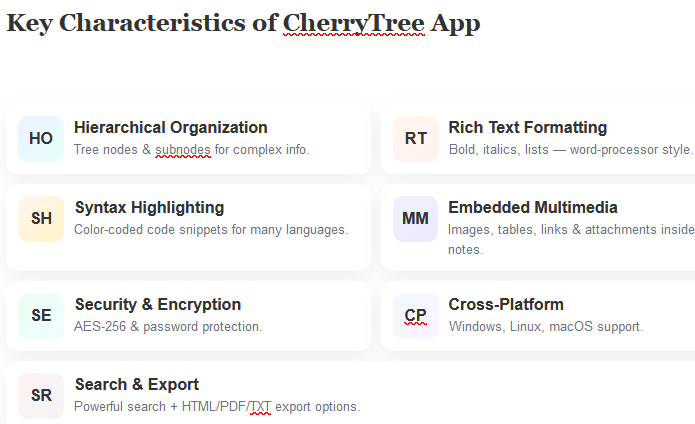
Key Characteristics of CherryTree App
-
Hierarchical Organization
-
Notes are arranged in a tree-like structure with nodes and subnodes.
-
Perfect for handling complex, layered information such as research projects, coding snippets, or security documentation.
-
-
Rich Text Formatting
-
Supports bold, italic, underline, bullet lists, and more.
-
Functions like a word processor while maintaining a lightweight interface.
-
-
Syntax Highlighting for Code
-
Supports multiple programming languages.
-
Developers can paste snippets and see them with color-coded syntax for better readability.
-
-
Embedded Multimedia and Files
-
Insert images, hyperlinks, tables, and attach files directly inside notes.
-
Makes CherryTree a central hub for technical documentation.
-
-
Security and Encryption
-
Offers AES-256 encryption to protect sensitive notes.
-
Supports password-protection for entire note databases.
-
-
Cross-Platform Support
-
Works on Windows, Linux, and macOS, ensuring smooth access across devices.
-
-
Powerful Search Functionality
-
Quickly locate specific text, code, or nodes across the entire database.
-
-
Export Options
-
Export notes into HTML, PDF, or plain text (TXT) formats.
-
Ideal for sharing reports, guides, or documentation.
-
Who Uses CherryTree?
-
Developers – Store snippets, manage project details, and maintain coding cheatsheets.
-
Researchers – Organize findings, academic references, and resource links.
-
Cybersecurity Professionals – Record tools, techniques, and workflows in a structured format.
-
Writers & Students – Manage brainstorms, essays, or non-linear notes across multiple topics.
Why CherryTree is Special
Unlike cloud-based apps that may compromise privacy, CherryTree prioritizes data control and offline access. Notes are saved in one single database file, either:
-
SQLite (.ctb) – Recommended for efficiency, encryption, and multimedia storage.
-
XML (.ctd) – Lightweight format for simpler use cases.
This makes backups, transfers, and portability effortless—CherryTree can even run from a USB stick without installation.
Where to Download CherryTree
CherryTree is free and open-source software. You can safely download it from its official sources:
Official Website: https://www.giuspen.com/cherrytree/
GitHub Repository: https://github.com/giuspen/cherrytree
Interesting Facts About CherryTree
Q1. What is CherryTree mainly used for?
CherryTree is used for hierarchical note-taking, code storage, research documentation, and personal knowledge management.
Q2. Can I protect my CherryTree notes with a password?
Yes, CherryTree supports AES-256 encryption and password protection for sensitive databases.
Q3. Is CherryTree available for Mac?
Yes, CherryTree runs on macOS, Windows, and Linux, making it cross-platform compatible.
Q4. What file formats does CherryTree support for saving notes?
CherryTree supports SQLite (.ctb) and XML (.ctd) for storing notes.
Q5. Can I export my notes from CherryTree?
Yes, you can export notes into HTML, PDF, and plain text, making it easy to share or publish content.